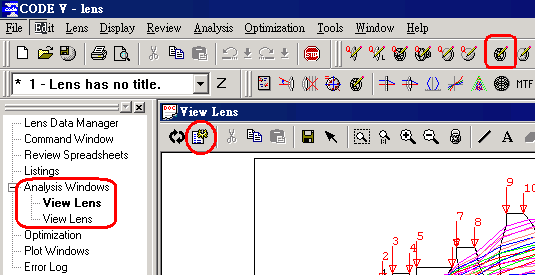
<P><FONT face=Arial size=2>The bellow figure is generated by “CODE V's icon”
<img src="data/attachment/forum/dvbbs/2004-9/20049492445954.gif" border="0" onload="if(this.width>screen.width*0.7) {this.resized=true; this.width=screen.width*0.7; this.alt=\'Click here to open new window\nCTRL+Mouse wheel to zoom in/out\';}" onmouseover="if(this.width>screen.width*0.7) {this.resized=true; this.width=screen.width*0.7; this.style.cursor=\'hand\'; this.alt=\'Click here to open new window\nCTRL+Mouse wheel to zoom in/out\';}" onclick="if(!this.resized) {return true;} else {window.open(\'data/attachment/forum/dvbbs/2004-9/20049492445954.gif\');}" onmousewheel="return imgzoom(this);" alt="" />
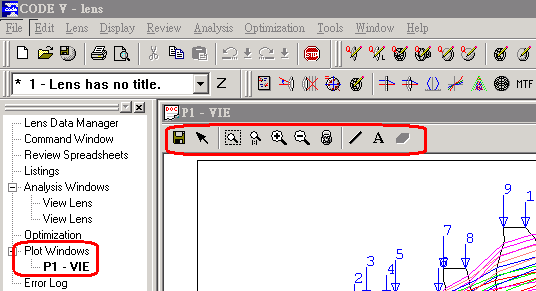
The bellow figure is generated by “bellow command”
VIE; CAN;
VIE
LAB Yes
LAB PRE BLA
PLC S1 YZ
ID YES
NBR SUR BLU
NBR ELE RED
DUM BLU
GO
<img src="data/attachment/forum/dvbbs/2004-9/20049492530228.gif" border="0" onload="if(this.width>screen.width*0.7) {this.resized=true; this.width=screen.width*0.7; this.alt=\'Click here to open new window\nCTRL+Mouse wheel to zoom in/out\';}" onmouseover="if(this.width>screen.width*0.7) {this.resized=true; this.width=screen.width*0.7; this.style.cursor=\'hand\'; this.alt=\'Click here to open new window\nCTRL+Mouse wheel to zoom in/out\';}" onclick="if(!this.resized) {return true;} else {window.open(\'data/attachment/forum/dvbbs/2004-9/20049492530228.gif\');}" onmousewheel="return imgzoom(this);" alt="" />
consultation :
1. When I execute the same “command”for the second times, the figure is generated in original window, but not in a new window. How can I generate a figure in a new window?
2. The figure that is generated by “command” has less tool bars. How can I show the same tool bars ?</FONT></P>
<P><FONT face=Arial size=2>Thanks !</FONT></P>
<P><FONT face=Arial size=2></FONT></P>
<P>Thanks. I use bellow commands,but, " new " figure is still generated in original window.</P>
<P>Would you show me the corrcet example? Thanks.</P>
<P>VIE; CAN;
VIE
LAB Yes
LAB PRE BLA
PLC S1 YZ
ID YES
NBR SUR BLU
NBR ELE RED
DUM BLU
wnd ope 4
GO</P>
<P>Thanks a lot.</P><P>May I ask you another quesition ? How can I let the name of my own macro "among the default trees" such as follow. </P>C:\Documents and Settings\lisuhuey\My Documents\1.gif
 关注公众号
关注公众号

 IP卡
IP卡 狗仔卡
狗仔卡 发表于 2004-9-4 17:25:00
 提升卡
提升卡 置顶卡
置顶卡 沉默卡
沉默卡 喧嚣卡
喧嚣卡 变色卡
变色卡 抢沙发
抢沙发 千斤顶
千斤顶 显身卡
显身卡 发表于 2004-9-6 16:30:00